DMARC at p=none Is Not DMARC: A Field Guide to Real Enforcement
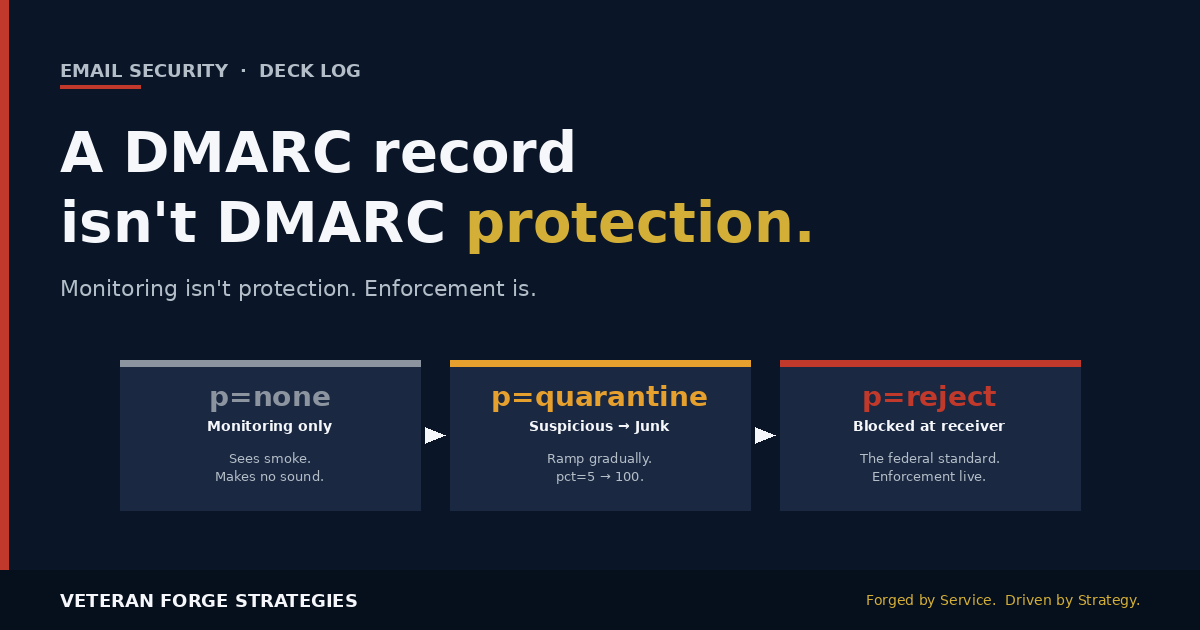
A DMARC record isn’t the same as DMARC protection.
Most domains that fail a security review aren’t missing DMARC. They have it — parked at p=none. That’s the monitoring setting. It tells you who’s spoofing you. It blocks exactly none of it.
Think of p=none as a smoke detector with the alarm wires cut. It sees the smoke. It just never makes a sound.
Why federal agencies moved off p=none
The federal civilian government learned this early. In October 2017, DHS issued Binding Operational Directive 18-01, which required every civilian executive-branch agency to publish DMARC records and move them to p=reject within a year. Not p=none. Not p=quarantine. Reject.
The results were quiet but dramatic. Independent measurements after enforcement showed successful phishing delivery against federal domains dropped from roughly 69% to about 14%. The fix wasn’t a shiny new tool. It was finishing the job — moving from “we have a record” to “we enforce it.”
Six years later, that same lesson still hasn’t fully landed in the private sector. Public reporting on 2026 adoption puts global DMARC deployment at roughly 52%, but of the domains that do publish a record, more than half are still parked at p=none. Monitoring only. Zero blocking.
Which is a problem, because we already covered on the Deck Log how attackers bypass Microsoft 365 with Direct Send. That attack works partly because the receiving side often has no aligned SPF, no aligned DKIM, and a DMARC policy that never rejects anything. DMARC enforcement is one of the two or three defenses that actually shuts that class of attack down.
The four gaps I keep finding on real audits
When I get called in to look at a small business or contractor’s email posture, the same four issues surface almost every time:
- DMARC left at p=none indefinitely and called “compliant.” Somebody published the record two years ago, ticked a checkbox on a compliance form, and never came back.
- SPF quietly broken past the 10-lookup DNS limit. Every time marketing adds another sending platform, the SPF record grows. Once it exceeds ten DNS lookups, the receiving side returns
permerrorand treats SPF as failed. Every legit sender starts failing alignment. - DKIM signing only some senders, not all. Google Workspace mail is signed. Marketing platform mail isn’t. Transactional mail from the app isn’t. HR benefits vendor mail isn’t. Half your traffic can’t align.
- An aggregate report address that nobody has opened in two years. The
rua=tag points at a mailbox nobody reads. All the signal DMARC is trying to give you is going straight into a black hole.
Any one of those alone can hold a domain at p=none forever. Together they’re why so many organizations have DMARC on paper but not in practice.
The methodical path from monitoring to enforcement
Enforcement isn’t risky when you do it in order. It gets risky when someone reads a blog post, jumps straight to p=reject, and immediately blocks legitimate mail from a payroll vendor nobody remembered to inventory. Here’s the sequence I use.
Phase 1 — Monitor at p=none and actually read the reports
Publish DMARC at p=none. Point rua= at a real analytics endpoint — either a paid service or your own parser. Give it two to four weeks. The goal at this phase is a complete inventory of every source sending mail with your domain in the From: header. That inventory almost always contains surprises: an old Mailchimp account, a helpdesk platform nobody documented, a domain-joined server sending backup reports on port 25.
You are not blocking anything yet. You’re building the map.
Phase 2 — Fix SPF and DKIM for every legitimate sender
For every source on the map, one of three things has to be true:
- The sending IP or hostname is covered by your SPF record, or
- The sender signs with DKIM using a key published under your domain, or
- Both.
If your SPF record is over ten DNS lookups, this is when you flatten it. Consolidate include: entries. Drop senders you don’t actually use. If the record still won’t fit, use an SPF-flattening service that resolves the lookups to raw IP ranges (accepting the tradeoff that you now own the freshness).
DKIM is the more forgiving of the two mechanisms because a valid signature survives forwarders and mailing lists. Where possible, prefer DKIM alignment as the primary path.
Phase 3 — Move to p=quarantine at pct=5, then ramp
Once your reports show every legitimate source aligning, change the policy to p=quarantine with pct=5. That means 5% of failing mail will be treated as suspicious — usually landing in Junk. The other 95% still gets a pass. This gives you a controlled blast radius. Watch the aggregate reports for a week. If nothing legitimate gets caught, ramp: 10, 25, 50, 100.
If something legitimate gets caught, you go back to Phase 2, fix the specific sender, and try again. This is the phase where surprises show up. Plan for it.
Phase 4 — p=reject at pct=100
Once p=quarantine; pct=100 has run clean for two to four weeks, move to p=reject; pct=100. From that point forward, any message claiming to be from your domain that can’t produce an aligned SPF or DKIM pass is dropped by the receiving server before it ever reaches an inbox. That is DMARC actually doing its job.
The pitfalls that break real mail
A short list of the things that most commonly go sideways during a rollout, so you can look for them before they bite:
- Marketing platforms sending on your behalf without alignment. Some vendors will send from their own domain in the
Return-Pathand only put your domain in the visibleFrom:. That fails SPF alignment. Fix: use custom DKIM signing keys the vendor publishes under your DNS. - Transactional mail from the app. SendGrid, Mailgun, Postmark, AWS SES — each has its own alignment setup. If your app pushes password resets and receipts through these, they must be aligned.
- HR, benefits, and payroll vendors. These typically send from noreply@yourdomain and expect you to authorize their IPs. Get them into SPF or, better, have them sign DKIM under your domain.
- Forwarders. An email forwarded through a third party will break SPF at the second hop. DKIM survives if the body isn’t modified. This is why DKIM-primary alignment is more resilient than SPF-primary.
- Subdomain sprawl. Your DMARC record covers the organizational domain. Subdomains inherit via the
sp=tag if you set it. If you don’t, a subdomain becomes an untracked back door. Setsp=rejectonce your top-level domain is enforced.
Why this matters more if you sell to the federal side
If you’re a contractor emailing a contracting officer at a .gov address, your unenforced DMARC is not just your problem. Their side has been at p=reject since 2018. Your outbound mail is graded against DMARC every time it enters their environment. Misaligned mail that would normally reach a commercial inbox with a “verify identity” warning may just quietly get spam-foldered or bounced on the federal side.
That failure mode is easy to miss because there’s no visible bounce most of the time. You send a capabilities statement, you never hear back, and you assume the contracting officer wasn’t interested. Sometimes they never saw it.
And with AI now writing phishing emails that read exactly like your contracting officer — same cadence, same signature block, same fiscal-year urgency — an unenforced domain is an open door. The impersonation risk cuts both ways.
The midweek gut-check
If your domain has a DMARC record, when did you last confirm it actually blocks anything? Pull the current record. Look at the p= value. Look at the pct=. Look at the rua= address and ask when it was last opened. That five-minute exercise is usually enough to tell you whether you’re enforcing DMARC or performing it.
Enforcement isn’t risky. Camping in monitoring forever and calling it security is.
This kind of methodical email-posture work is exactly what a Fractional IT engagement covers — build the sender inventory, fix the SPF and DKIM gaps, stage the DMARC policy up to enforcement, and hand you back a domain that actually rejects the mail it should. If you want a second set of eyes on your current DMARC posture, reach out.